Cetta
SMS messaging & consent
Last updated: September 4, 2026
Cetta is an event planning platform. Hosts use it to invite guests to a party or a potluck and to coordinate who is bringing what. This page describes our text-message programs: how you opt in, what we send, how often, and how to stop.
Cetta only ever texts a number its owner typed in themselves. Nobody can sign up someone else's phone: when a host builds a guest list, Cetta emails the guests who have an email address, and the host texts the rest from their own phone. Cetta does not send those texts.
Replying to an invitation
When you reply to a host's invitation on its Cetta page, you sign in with a one-time code sent to your own email or mobile number. If you signed in with your mobile number, an unticked box labelled "Text me a reminder about this party" appears with your reply. Ticking it is the opt-in: Cetta then texts you a reminder the day before that party, and a note when the host answers a message you sent from the invitation. Leaving it unticked means no texts. The words beside the box are:
Text me about this party: a reminder the day before, and a note when the host replies to a message I send. I agree to receive those texts from Cetta at this number, only about parties I reply to. Message and data rates may apply. Reply STOP to opt out or HELP for help.
Opting in to reminders
A potluck sign-up sheet is a public page where guests claim what they'll bring. When you claim something you can leave an email or a mobile number so Cetta can remind you what you're bringing, about two days before the party. If you type a mobile number, an unticked box appears beside it. Ticking that box is the opt-in; leaving it unticked means no texts. The words beside the box are:
Text me a reminder about this party, about two days before. I agree to receive that text from Cetta at this number — one per party I sign up for. Message and data rates may apply. Reply STOP to opt out or HELP for help.
The claim form's contact field, exactly as it appears on a potluck sign-up page (try it — this copy isn't connected to anything)
Text me a reminder about this party, about two days before. I agree to receive that text from Cetta at this number — one per party I sign up for. Message and data rates may apply. Reply STOP to opt out or HELP for help. See our Privacy Policy and Terms. Leave it unticked and we won't text you.
See it live. A permanent example potluck is open to anyone at trycetta.com/p/N24BWMEQ. Tap I'll bring this on any item, enter a mobile number, and the box appears. Reminders are switched off on that list and its date never arrives, so nothing is sent from it.
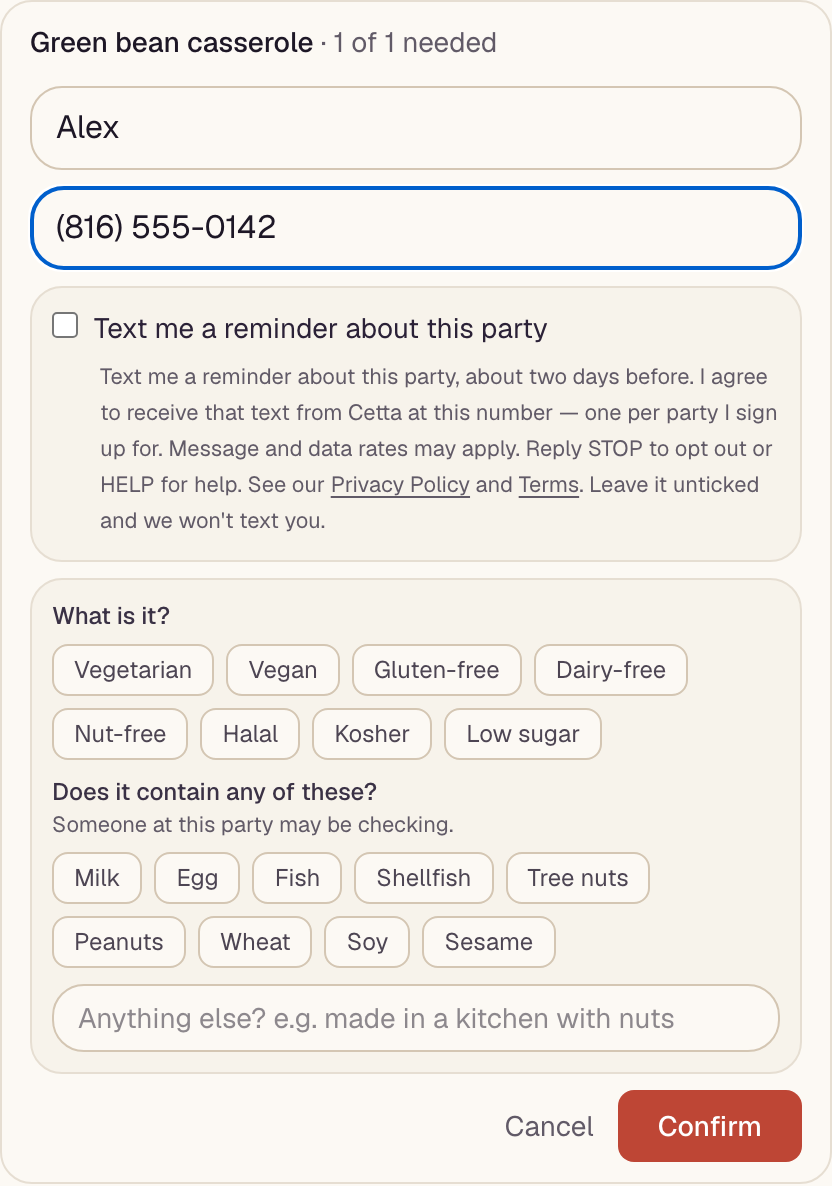
When you tick the box, Cetta records the time and the exact wording you agreed to alongside your claim. Only claims with that record are ever texted. We never buy phone numbers, and we never use a number for anyone else's marketing.
Opting in to booking updates
Hosts who book vendors through Cetta, and vendors who take those bookings, can also choose to get booking updates by text: a request to confirm details, a summary the day before, and a live status line on the day (for example, when a vendor is on the way). This is off for every account until the person turns it on themselves, in their own notification settings (trycetta.com/notification-prefs or the Cetta app), by typing their own mobile number, ticking an unticked box, and entering a one-time code we text to that number. Nothing is saved until the code is entered. The words beside the box are:
Text me about my Cetta bookings — confirmation requests, a reminder the day before, and live updates on the day (for example, when a vendor is on the way). I agree to receive those texts from Cetta at this number. Message frequency varies by booking. Message and data rates may apply. Reply STOP to opt out or HELP for help.
The settings control, exactly as it appears under Notification preferences → Channels (this copy isn't connected to anything)
Off until you add your own mobile number here and confirm it with a code. You'll still get everything by email and push.
Text me about my Cetta bookings — confirmation requests, a reminder the day before, and live updates on the day (for example, when a vendor is on the way). I agree to receive those texts from Cetta at this number. Message frequency varies by booking. Message and data rates may apply. Reply STOP to opt out or HELP for help. See our Privacy Policy and Terms. Leave it unticked and we won't text you.
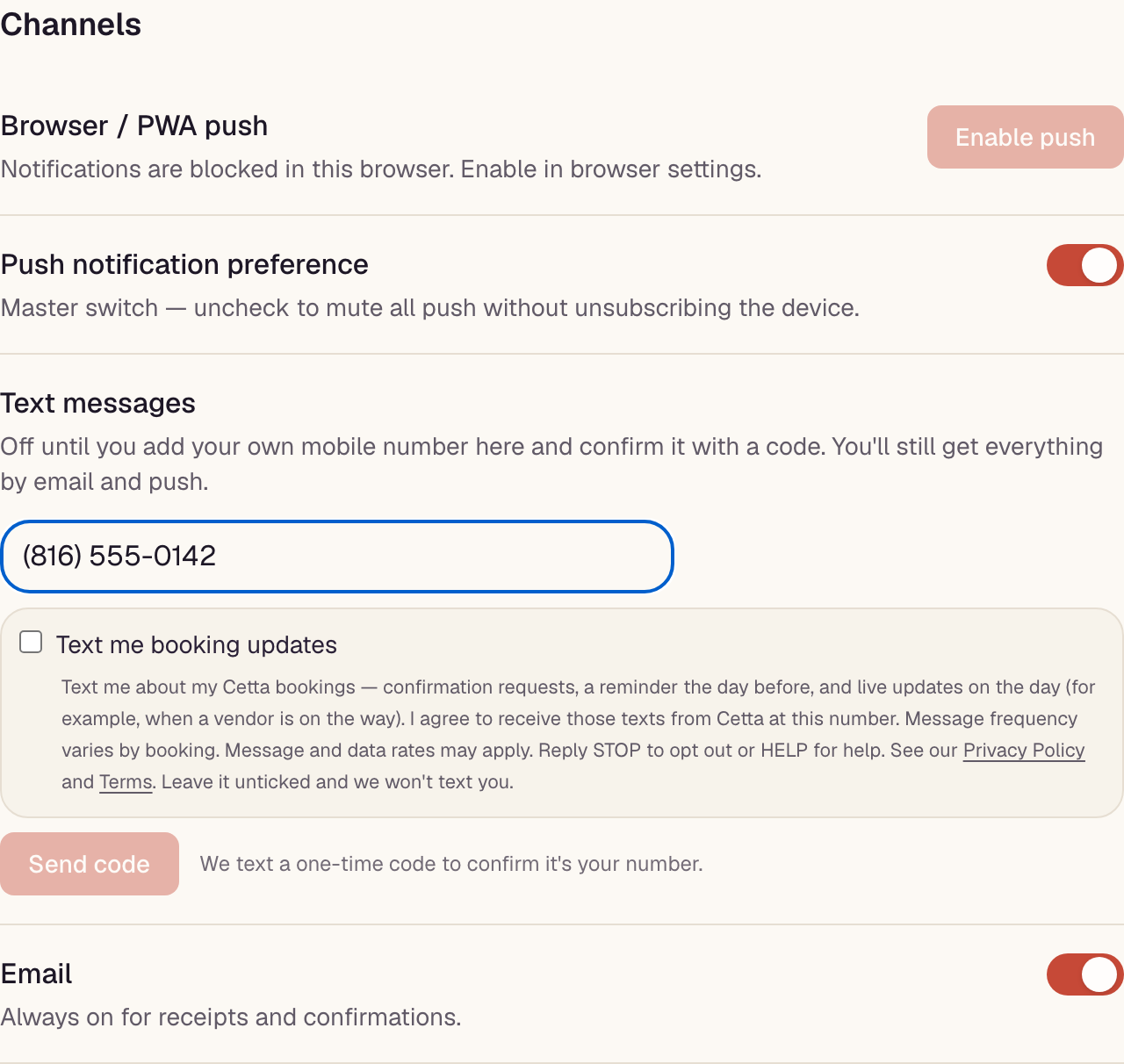
The switch next to a confirmed number pauses these texts; Remove number deletes the number and the consent record together. Vendors have the same control in the Cetta app.
How invitations reach you
When a host invites you to a party or a potluck, Cetta sends the invitation by email if the host has your email address. If the host only has your mobile number, Cetta does not text you — it gives the host a pre-written message, and they send it to you from their own phone, as themselves. The first text you ever get from Cetta's number is one you opted in to on a form you filled in yourself.
Opting in to sign-in codes
Cetta has no passwords. To sign in, you enter your own email address or mobile number at trycetta.com/login (or in the Cetta app) and ask for a code. Entering your own mobile number and requesting the code is the opt-in — nobody else can trigger a code to your number, and one code is sent per request. This is the disclosure shown directly under that field, before you submit:
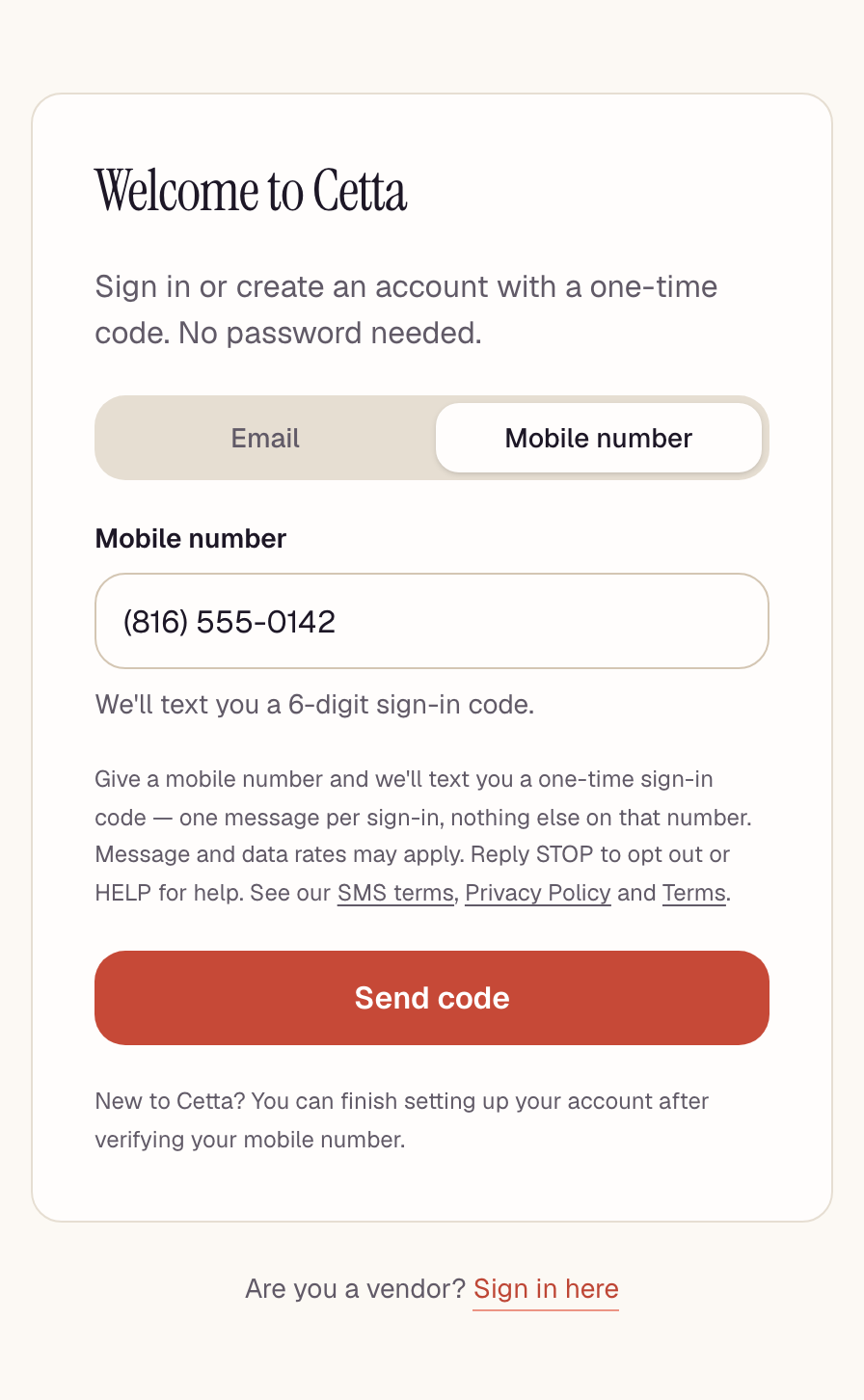
The disclosure under the field reads, in full:
Give a mobile number and we'll text you a one-time sign-in code: one message per sign-in, nothing else on that number. Message and data rates may apply. Reply STOP to opt out or HELP for help. See our SMS terms, Privacy Policy and Terms.
Sign-in codes are a separate program from reminders. Giving your number to sign in does not subscribe you to anything else.
What messages you'll receive
If you opted in on a potluck sign-up sheet: one reminder per party. If you turned on booking updates in your settings: the booking messages below, for your own bookings only. These are the actual texts Cetta sends, as they arrive:
Reminder — what you're bringing (about two days before)
Friendsgiving at the Kims is this Saturday. You're bringing: green bean casserole, dinner rolls. https://trycetta.com/i/N24BWMEQ Reply STOP to opt out.
Booking update — host, day before
Cetta: 2 bookings are all confirmed for tomorrow. We'll send you a status update for each vendor on the day of. Reply STOP to opt out.
Booking update — host, vendor on the way
Cetta: Sarah's Tacos is on the way with Taco bar for 40 — ETA about 20 min. Reply STOP to opt out.
Booking update — vendor, confirm request
Cetta: You're booked for Taco bar for 40 on Sat, Oct 10 (ZIP 64111). Please open Cetta and confirm you're still on so the host can count on you. Reply STOP to opt out.
Sign-in codes
Cetta has no passwords. If you sign in with your mobile number, we text you a one-time 6-digit code — only ever in direct response to a sign-in you just started, and only to the number that requested it. Codes expire in 10 minutes.
Sign-in code
Cetta sign-in code: 418239
Expires in 10 minutes. Didn't request it? Just ignore this text.
Reply STOP to opt out, HELP for help.
Every code says who it's from and how to stop, even though it is a single message you asked for seconds earlier rather than an ongoing program. Replying STOP to a sign-in code, or to any other Cetta message, stops these too — see below.
Message frequency, rates, and how to stop
Frequency. Sign-in codes: one message per sign-in request, nothing recurring. Potluck reminders: one text per party you opt in on, about two days before it. Booking updates: a handful per booking — a confirmation request, the day-before summary, and one status line per vendor on the day — and none between bookings. Frequency therefore varies with how many parties you sign up for and how many bookings you have.
Rates. Message and data rates may apply, per your mobile carrier plan.
Stopping. Reply STOP to any Cetta message to stop receiving them. You'll get one confirmation, and nothing after that. Reply HELP for help, or email support@trycetta.com.
Opting out is honoured immediately and applies to that number across every kind of Cetta text. That includes sign-in codes — so if you stop texts and your account uses a phone number to sign in, use your email address instead. Reply START to resubscribe.
Your number
We do not share or sell your mobile information. Mobile phone numbers and SMS consent are never shared with or sold to third parties or affiliates for their marketing or promotional purposes. Numbers are shared only with the providers needed to deliver a message you asked for (our SMS carrier), and with the host of an event you gave your details to — who sees what you gave their event, and nothing more.
Opting out of texts does not close your Cetta account.
To have a number removed entirely rather than just unsubscribed, email support@trycetta.com.